이클립스 처럼 버튼 몇번 해서 되는게 아니더라구요...
이클립스가 무겁고 해서...
좀 불변하지만 빠른 VSCode 로 넘어온거잖아요??ㅋㅋ(나만그런가..)
본론으로 들어가서....
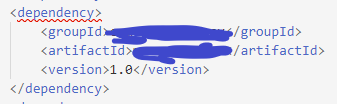
우리는 저 위 쪽 시뻘건 줄을 없애야 합니다 그죠?
'요'는 Maven 명령어로 해야해요
그러니까 Maven 사이트에서 Maven 다운 받고
환경변수 설정해서
Cmd 나 Powershell 에 mvn 명령어가 실행되게 준비가 필요합니다.
프로젝트 폴더 내에 mvn.cmd(mvnw?) 가 있으면 그거 쓰시면되요~
그리고 VSCODE 선행 플러그인
Maven for Java [JAVA 니까 자바 플러그인 들도 있어야 겠죵? (JAVA 플러그인 생략)]
Spring boot 플러그인 세트 [Spring Boot Tools, Spring Boot Dashboard, Spring Boot Extension Pack]
모르는 영어 억지로 파파고 형님 힘을 빌어서 검색하면서 찾았어요
출처 :
https://maven.apache.org/plugins/maven-install-plugin/usage.html
Apache Maven Install Plugin – Usage
Usage Apache Maven has a two level strategy to resolve and distribute files, which we call artifacts. The first level is called the local repository, which is the artifact cache on your system, by default located at ${user.home}/.m2/repository. When execut
maven.apache.org
Import 명령어 기본형식
> mvn install:install-file -Dfile=your-artifact-1.0.jar <- mvn 일때
> "C:\project\API\mvn.cmd" install:install-file -Dfile=your-artifact-1.0.jar <- mvn.cmd 일때
-Dfile : import 시킬 jar 파일 위치
예를 들어.....

요기 위치겠죠?
써보면
mvn install:install-file -Dfile=C:\project\blank\API\lib\ojdbc8-19.3.0.0.jar
가 됩니다.
위 명령어는 .m2/repository/... 로 인스톨 시켜주는거에요
근데 저렇게하면 엄한 곳에 설치되서
이거만으로는 Pom.xml 에러를 해결 못해요
그래서 옵션이 필요한데
종류는
- [-DpomFile=your-pom.xml]
- [-Dsources=src.jar]
- [-Djavadoc=apidocs.jar]
- [-DgroupId=org.some.group]
- [-DartifactId=your-artifact]
- [-Dversion=1.0]
- [-Dpackaging=jar]
- [-Dclassifier=sources]
- [-DgeneratePom=true]
- [-DcreateChecksum=true]
이렇게되고
여기서 사용하는 옵션은
-DgroupId -- pom.xml 에 groupId
-DartifactId -- pom.xml 에 artifactId
-Dversion -- pom.xml 에 version
-Dpackaging -- jar
4가지 입니다.
전부 쓰면....
mvn install:install-file -Dfile=C:\project\blank\API\lib\ojdbc8-19.3.0.0.jar -DgroupId=com.blank.some -DartifactId=somthing -Dversion=1.0.0.0 -Dpackaging=jar
이렇게 입력하면....


완료!!
하지만!
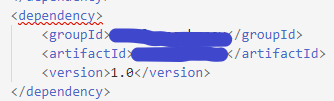
아직 뻘건줄이 안없어지고 있습니다.
그러니까 진짜 마지막으로!
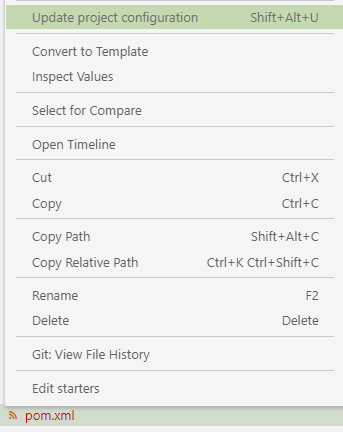
pom.xml 에 마우스 우클릭 후 Update project configuration 을 클릭하면...!!
***Spring Boot 플러그인 세트 없으면 안나와요~***

끝!